Send product text, files, or complete localization orders. Localize.io
combines each string with the glossary terms, translation memory, style rules and
screen context that actually apply to it, then returns checked work with a record
of how it was made. Connect over the API, or let your AI agents do it over MCP.
Each example changes one thing and keeps everything else the same: the same source,
the same instructions, the same language. On the left is the translation without that
context, on the right the translation with it. All are real results, English to
Lithuanian.
Example 1 · Screenshot
A string doesn't explain itself.The screen does.
“Current” can mean the present time, a status, or electricity. Next to
“2.4 A” on a charging screen, it means electrical current. The only thing that changed
between the two runs is the screenshot.
Source · EnglishCurrent
Without a screenshot
Dabartinispresent, current
no screen
The translator sees one word and nothing else.
With a screenshot
Srovėelectrical current
What the translator was told about the screen
Device diagnostics, power-input screen
“Current” is the label beside “2.4 A”
A short technical label; units follow it
See what the translator saw
Screen
Described once, when uploaded. The description (purpose, register, visible elements, where this string sits and how much room it has) travels with the string.
Translator
Worked from that description, not from the image itself.
Checks
Passed
Observed cost
$0.0019 without the screen, $0.0061 with it
Example 2 · Glossary
Your product vocabulary stays yours.
Without your terminology, “Flow” is an ordinary noun and gets translated
like one. With a single approved glossary entry, the feature keeps its name.
Source · EnglishCreate a new Flow
Without a glossary
Sukurti naują srautą
“Flow” reads as the common noun: srautas, a stream.
With a glossary
Sukurti naują „Flow“
Glossary entry
Flow → Flow
The product feature used to build an automated workflow.
Product feature name: keep spelling and capitals, do not translate.
See what the translator saw
Terms available
1
Terms selected
1 for this string. Only the terms that apply to a string travel with it, not the whole glossary.
Observed cost
$0.0019 without, $0.0029 with
Example 3 · Translation memory
Memory informs the translation.It doesn't switch off judgment.
An exact match from your translation memory is strong evidence, not
untouchable output. Your preferred wording is kept even where a fresh translation would
say it differently, and a stored mistake is corrected rather than repeated.
Kept · EnglishSave changes
Without memory
Išsaugoti pakeitimusnew
With memory
Memory saysIšsaugokite pakeitimus
Išsaugokite pakeitimusas_is
Corrected · EnglishDelete account
Without memory
Ištrinti paskyrąnew
With memory
Memory saysIštrinti paskyyrą (contains a typo)
Ištrinti paskyrąfixed
new translated without a memory entryas_is remembered translation kept, after review, and not charged the per-character ratefixed remembered translation corrected
Keeping your translation memory
Keep every translation as three things together: the source text, the
target text, and its context.
Source: the original string, exactly as it appears in your product.
Target: the approved translation, under the language code you order with.
Context: where the string appears and what it does, for example “Checkout
page, button that confirms payment”. Without it, the same word in a menu and in a
heading looks identical.
The memory is yours. When a translation is approved or corrected, add it to your
memory, and upload the memory again before your next order.
See what the translator saw
Memory matches
2 exact, 0 near, 0 strings without memory
Decisions
Both made by the translator with the memory in front of it. as_is means reviewed and kept, not skipped.
The memory holds an informal sentence (“tu gali”, you can). The style guide
asks for formal address. The meaning stays the same; how the product speaks to its user
changes. Lithuanian usually drops the pronoun, so the formal plural verb “galite” is the
whole change.
Source · EnglishHere you can change your password.
Memory only
Memory saysČia tu gali pakeisti savo slaptažodį.
Čia tu gali pakeisti savo slaptažodį.as_is
No style guide, so as far as the translator knows the remembered sentence is fine.
Memory and style guide
Memory saysČia tu gali pakeisti savo slaptažodį.
Čia galite pakeisti savo slaptažodį.fixed
Style guide, Lithuanian
Address the user formally: jūs, jūsų, plural verb forms.
No informal tu, tavo, tave.
Correct informal wording found in memory.
See what the translator saw
Memory
1 exact match in both runs
Style guide
Absent in the first run, applied in the second
Observed cost
$0.0034 memory only, $0.0039 with the style guide
Step 1 · Configuration
One configuration is the routing map.
Routing decides which model does each piece of work. You set it once, by language,
content type, project and pass, and every order follows it. Nothing is guessed: an
order the configuration doesn't cover is refused when it arrives, and the refusal says
which setting would have answered it.
Configuration · Routing
The same language,routed three ways.
Short interface strings go to a fast model, marketing copy to a stronger
one, and a second model reviews the draft.
ja · ui→gpt-5.6-lunafast · languages.ja
ja · marketing→gpt-5.6-solstronger · content_types.marketing.languages.ja
ja · marketing · proofread→gpt-6.1-solreviews the draft · job_types.proofread
How an order moves through your configuration
How an order moves through the service: it arrives as a file or strings;
intake identifies the project, the language pair and the content type, and refuses anything
the configuration doesn't cover; the configuration picks the route and the models; a
model reads every string against your glossary, translation memory and screenshots and
chooses what applies to each one, and your style guide goes with the whole job; each string
is translated; the result is checked twice, by counting (every string
back once, nothing empty, placeholders and tags identical, length limits, line breaks) and by
a model judging terminology; strings that fail go back to be retranslated with the findings,
up to three attempts, each logged, and a string that still fails comes back flagged with what happened while the rest is delivered; the
same structure comes back with a record of how it was made.
1 · Arrives
Your order
strings, or a file your pipeline exports
app.json
2 · Intake
Projectmobile-app
Language pairen → lt
Content typemarketing
not configured → refused
3 · Route
The configuration picks the model
most specific setting wins
gpt-5.6-sol
4 · Context
Glossarythe terms it is about
Screenshotsthe screen it is on
Style guideyour voice, whole
Memorynearest in meaning, scored
5 · Translate
Translated with that evidence
and says what it did with your memory: new, as_is or fixed
↺ failed strings come back here, with the findings
6 · Check
Counted · no modelStructure
every string back · placeholders and tags · length limits · line breaks
Judged · a modelTerminology
required terms used, ruled-out terms absent
✗ fails → retranslated, up to 3 attempts, each one loggedstill failing → flagged, with what happened
7 · Returned
The same structure back
with the record: model, context used, checks and attempts, cost
app.lt.json
Configuration · Account and project
Set once for the account,overridden per project.
Account-wide · config.json
Set once, for every project
Your languages and language pairs, your content types, your own locale codes, and
the models used by default. A new project starts with all of it.
→
Per project · projects/<name>/config.json
Overrides only what it names
A project changes what it needs (a stronger model for marketing copy, a review pass)
and inherits the rest. A project that lists its own languages or content types is
limited to those.
Glossaries, translation memory and style guides sit at the same two
levels. Material in the account applies to every project; a project's own material
is added to it, and wins where the two disagree.
Configuration · Settings
What each setting decides
Setting
What it decides
For example
languages
The target languages you can order. from makes one a pair: Polish from German is different work from Polish from English, and is ordered separately.
"pl-PL": { "from": "de" }
aliases
Your platform's own codes for a declared language. You get your code back in the result.
"de_DE": "de-DE"
content_types
The kinds of content an order can name. Each can be routed differently, and every order says which one it is.
"ui", "marketing"
model
Which model translates. It can be set for everything, for one language, for one content type, or for one content type into one language.
"openai/gpt-5.6-sol"
annotator
Which model reads your screenshots and writes the description that travels with the strings on them.
"google/gemini-3.5-flash-lite"
selector
Which model reads each string, before it is translated, and chooses which of your glossary terms, remembered translations and screenshots apply to it.
"google/gemini-3.5-flash-lite"
embedder
Which model your translation memory is searched with, by meaning, so earlier translations worded differently are still found.
"openai/text-embedding-3-small"
qa
Which model checks that your terminology was used. Never the model that translated: a model marking its own work agrees with it.
"google/gemini-3.5-flash-lite"
job_types
Settings for one pass, such as a review after translation, in a project. A pass outranks the content type.
"proofread": { "model": … }
defaults
The models and provider used where nothing more specific says otherwise.
"defaults": { "model": … }
One order · "models"
Choose the models for one order
An order can name its own model for translation, for reading its screenshots, for
choosing what each string is shown, and for the terminology check, from the models
offered for each (GET /v1/models). Anything else is refused
when the order arrives.
Your files · PUT /v1/config
Change the configuration yourself
Read it, change it, send it back: checked before it replaces anything, never
overwriting a change you haven't seen, and every earlier version kept to restore. It
needs a key you have allowed to change configuration.
Configuration · Which setting wins
The most specific setting wins
Each of model,
annotator,
selector, embedder and qa is taken from
the first place that sets it, reading down. Anything a level doesn't mention is
inherited from the one below. An order can name its own models above all of these.
Project this pass, into this language
Project this pass
Project this content type, into this language
Project this content type
Project this language
Project the project, then its defaults
Account this content type, into this language
Account this content type
Account this language
Account the account, then its defaults
Route an order
Uses the two files above.
Configuration · Draft and review
A draft, then a review by a second model
An order can ask for more than one pass. One model
writes the draft; a second, often more careful one reads it in the target language
and corrects it. Each pass is routed on its own, under job_types
in a project, and a pass outranks the content type. The record keeps both.
Pass 1 · translategpt-5.6-lunafrom the account's defaults
Hand over what you already have.It becomes the translator's reference.
Brand books, style guides, glossaries, past translations, screenshots of your
product: upload them as they are, in your own folders, names and formats. There is
nothing to convert or reorganise first. Each file is recognised by what is inside it,
whatever its format: one in a shape nothing here reads directly is read by a model and
converted, beside your file, which stays as you sent it. From the next job on the
translator works with it beside every string.
You upload · as it is
Brand Voice v3.docx
Tone of voice.pdf
terms de.csv
Product glossary.tbx
memory/2025/app.tmx
screens/charging.png
screens/settings.png
Each picture is described once, when you upload it: what the screen is for,
what is on it, how it speaks. Before translating, a model works out which strings
are on which screen, and each string travels with the screen it is on.
A model reads each string and picks the terms it is about, by meaning rather
than spelling. Those travel with it, with their definitions and any wording you have
ruled out, and a check confirms they were used.
Exact matches, and the ten nearest in meaning with how near each is, as evidence
the translator weighs. Kept when right, corrected when not. Your memory is made
searchable once, by the first job that uses it, and reused after that.
Your rules for address, tone, punctuation and wording, applied to every string.
Account and project guides add up.
any document
Never rewritten. Your files stay byte for byte as uploaded, and you can download any of them back unchanged.
Two levels. Material in your account applies to every project; a project's own is added on top, and wins where they disagree.
Your folders, your codes. A language written in a file, its name or its folders is read from there, spelled as you spelled it. Folders are yours to arrange.
Unreadable is reported, never skipped. A file that can't be read says so, instead of quietly not being used. Your cabinet's Files tab shows every file, what it was read as and what came out of it.
A picture of the screen sayswhat a sentence about it can't.
How much room a button has, what sits beside a label, whether a word is a
heading or a command. The translator is never shown the picture itself: a model reads
it once and writes down what the screen is for and what is on it, and those words
travel with every string on that screen.
images: png · jpg · webp · gif · not video
What it does
Described once, when you upload it: the screen's purpose, every element on
it with its role and where it sits, and how the screen speaks.
Matched to strings by a model before translating: it works out which of
your strings are on which screen, so each one is translated knowing its place.
Kept until you delete it. Described once, used by every job after.
What to bring
Your product's screens in the account's or the project's material: they
apply to every job there.
A screen for one order, uploaded with that order instead (POST
/v1/uploads, then named on the strings it shows), up to 32 MB.
The source language on screen: the picture is matched to strings by what
they say.
Getting the most out of it
One screen per picture, at the size people see it. A collage of six
screens is described as one.
The states that change the words: the empty basket, the error, the
confirmation, each its own picture.
A note when it isn't obvious: with an order's screenshot, a line such as
“the empty state of the checkout screen” steers what the model looks for.
Your terms, chosen string by string,and checked after.
A glossary is not pasted in whole. Before translating, a model reads each
string and picks the terms it is actually about, by meaning rather than spelling, and
only those travel with it. After translating, a different model checks that they were
used, and a string that missed one is translated again.
What it does
Picked per string: in a glossary of two thousand terms, the translator sees
the two a string is about, not all two thousand.
Everything you wrote down travels: definition, part of speech, usage,
status, a forbidden variant, a column of your own such as Notes, under the name
your file gives it.
Checked by another model than the one that translated: a model marking its
own work agrees with it.
What to bring
Your glossary, in as many languages as it has, as your tool exports it: TBX,
a spreadsheet with a column per language, JSON, whatever it writes. One file serves
every target language in it, for jobs translated from the language its terms are in,
which is read from the file.
Terminology in one language, if that is what you keep: approved terms with
their definitions.
The terms that matter: product names, features, legal and domain words,
the ones a reviewer keeps correcting.
Getting the most out of it
A definition where a word means two things. “Charge” the battery and
“charge” the fee are two rows, and the definition is how the right one is picked.
The wording you have ruled out, as a forbidden variant: the check then
looks for it as well.
Language codes in the header, such as en and de-DE,
are read as written. A header saying “German” is worked out from the file first.
Every exact match, with every translation of it, and the ten remembered
strings nearest in meaning, each with how near it is. The translator decides what to
keep, what to correct and what to translate afresh, and says which it did for every
string. Nothing is copied past it.
What it does
Exact matches, every one: a string remembered two ways is shown both ways,
with each one's key, context, review state and date.
The ten nearest by meaning, scored, found as shown below.
Reused word for word, not charged: a string delivered exactly as your
memory has it is not charged the per-character rate.
What to bring
The memory you have, exported from your tool in whatever it writes: TMX,
XLIFF, PO, a spreadsheet with a column per language, its own JSON.
Approved translations: a memory full of unreviewed drafts is evidence of
drafts.
Context and keys on each unit where you have them: a unit whose key is the
same as a string's id is recognised as that very string's.
Getting the most out of it
Source, target and context together, for every translation, as Example 3 describes.
Kept current by you. Nothing a job delivers is remembered here: add what
was approved or corrected, and upload the memory again before the next order.
Stable keys. An id from a string's place in a batch names a different
string in the next order; use the key your code gives it.
How your memory is searched
An exact match is a lookup. Everything
else is found by meaning, not by spelling: sent “Dieses Feld muss ausgefüllt werden”,
the remembered “Pflichtfeld” comes back among the nearest (0.62, measured), though the two
share no word a search by spelling could have matched.
1 · Every remembered string, as a vector
Each source string in your memory is turned into an embedding: a list of numbers that
places it by what it means. Done once, by the first job that needs it, and kept: an edit
to your memory embeds only what changed.
OpenAI text-embedding-3-small, 256 dimensions · 94,000 remembered strings took two
minutes and under a cent
2 · Each string you send, compared with all of them
The string is embedded the same way, and its similarity to every remembered string is
measured: 1.00 is the same meaning, unrelated text far lower.
every remembered string is compared; nothing is filtered out first
3 · The ten nearest go to the translator, scored
Beside the exact matches, with every translation of each and how near it is. The
translator decides what to use and says so for each string: as_is,
fixed or new.
no threshold decides for it: a distant match can still settle a term
Sent: “Save your changes before leaving?” — six remembered strings, nearest first
0.76
Save changes
0.71
You have unsaved changes. Leave anyway?
0.61
Your changes have been saved
0.50
Discard changes
0.36
Delete account
0.24
Battery is charging
Measured with the embedder this service uses. The second line shares almost no
words with what was sent, and is the closest in what it asks; a search by spelling would
have put it below “Discard changes”. Your own matches, with their scores, are in every
job's record.
How you address people, how formal you are, what you never say, how you
write dates and numbers. A style guide is handed to the translator with every batch it
translates, as you wrote it.
What it does
Read whole, not summarised or picked from: every rule reaches every string.
Per language where you say so. A guide whose name or folder names a
language (style/de/voice.md) is for that language; one that names none
is for every language.
Account and project add up: your company's voice first, then the project's
own rules on top.
What to bring
The guide you already have, in whatever format it is in: a document, a web
page, a PDF. A PDF is read by a model into text, once, and the reading is kept
beside your file.
A brand book, if its tone of voice is written in prose. A board of logos
and colours has nothing a translator can apply, and is stored but not used.
One guide per target language where your rules differ by language: formal
address in German, informal in Lithuanian.
Getting the most out of it
Rules, with an example each: “address the reader as Sie; never du”, beside
one sentence written that way.
The decisions a translator would otherwise guess: address form, product
names that stay in English, quotation marks, units, how long a button may be.
Not in a string's context. Tone and audience belong in the guide, once;
a string's context says where it is and what it does.
Step 3 · Send work
Send strings or whole files.Get the same shape back.
Send a structured order of strings, a line of plain text, or the file your
localization pipeline already exports (Tanker keysets today, other formats on request),
and get the same format back with translated targets filled in. Jobs run in the
background: queued, processing, done. Keys, sources, comments, metadata and
placeholders stay exactly as they were.
Context is the strongest thing you can send. With each string, say where it
appears, what it must fit and which names stay as written: a segment's
context and max_length, or your file's comments. A length
limit is enforced. An order with no context at all, or a field the service doesn't
read, is accepted and named in the job's warnings, so a missing field is never
silent. For an interface string, add a screenshot of it in place: the picture
shows how much room there is, and the context names what sits beside it.
You send · German
{
  "checkout.pay_button": {
    "source": "{amount} bezahlen",
    "comment": "Button on the order summary",
    "target": ""
  },
  "properties": { "source": "de", "target": "pl-PL" }
}
You get back · Polish
{
  "checkout.pay_button": {
    "source": "{amount} bezahlen",
    "comment": "Button on the order summary",
    "target": "Zapłać {amount}"
  },
  "properties": { "source": "de", "target": "pl-PL" }
}
An illustrative file. The figures below are from a real client export.
4release files
49UI strings translated
100%keys, comments, metadata and placeholders intact
Point at the screen a string lives on
Besides the screenshots in your assets, you can
attach a picture to one order, or to the strings it explains, with a note of your own:
“the empty state of the payouts screen”, “Pro is the brand, never translate it”. The
picture is described once and the description goes with those strings; your note
reaches the translator whatever the picture shows. One screen can serve twenty
labels.
# attach the picture, with a note
curl -X POST https://t.localize.io/v1/uploads \
-H "authorization: Bearer $LOCALIZE_IO_TOKEN" \
-F '[email protected];type=image/png' \
-F 'meta={"note": "empty state of the payouts screen"}'
# → {"id": "up_9f2c8d1e4a7b", …}# then name it on the strings it explains
{"segments": [{"id": "payouts.empty",
"text": "No payouts yet",
"references": ["up_9f2c8d1e4a7b"]}]}
Your codes, as you sent them.pt_br, pt-BR and PT-BR find the same language, and the result comes back with your spelling. Platform names like zh_Hans are mapped once, in configuration.
Every order says who asked. A person, a team or a pipeline: it is recorded with the job, so any result can be traced back to whoever ordered it.
Checked on arrival. A language, content type, project or screenshot the order can't use is refused straight away, before anything is spent.
Step 4 · Results and the record
Every job is traceable,down to the prompt.
Nothing about how your translation was made is hidden from you. For every job you can
see who asked for it, how it was routed and which setting decided it, which model answered, the exact
prompt that went in and the reply that came out, the terms, memories and screen
descriptions that were sent with it, every check and every attempt, and what each call
cost. It is recorded as it happens, because none of it can be reconstructed from the
result afterwards.
Routedmodel gpt-5.6-sol, set by projects/mobile-app/config.json › content_types.marketing
Model call 1 · selectionchose what the string is shown: 1 glossary term of 1 · no memory match · no screen · $0.0003
Context assembledthe chosen term on the string · style guide applied
Model call 2 · translation1,184 tokens in · 96 out · 2.1 s · $0.0029
Prompt in
Translate from English (en) into Lithuanian (lt).
Glossary, for this segment:
  Flow → Flow  (product feature name; do not translate)
Segment ex.flow: "Create a new Flow"
…
Reply out
{"id": "ex.flow",
 "text": "Sukurti naują „Flow“",
 "memory_use": "new"}
Model call 3 · terminology checkjudged: the required term was used · no findings · $0.0004
Checkedcounted: all strings back, placeholders identical, limits kept · passed on attempt 1 of 3
Delivered3 calls · $0.0036 in total · 17 characters, priced at your plan
Where you read it
Your cabinet. Every job with its characters and its price, fixed when it was delivered, and a Model calls tab listing every call made for your work, each one openable to its prompt and reply.
GET /v1/jobs/{id}/trace How one job was made, in order: routing, context, calls, checks, cost.
GET /v1/calls Every model call for your account, and /v1/calls/{id} for one call whole, prompt and reply.
GET /v1/log The running record of your account, filterable by project and event.
The record shown here is a shortened illustration of a real one.
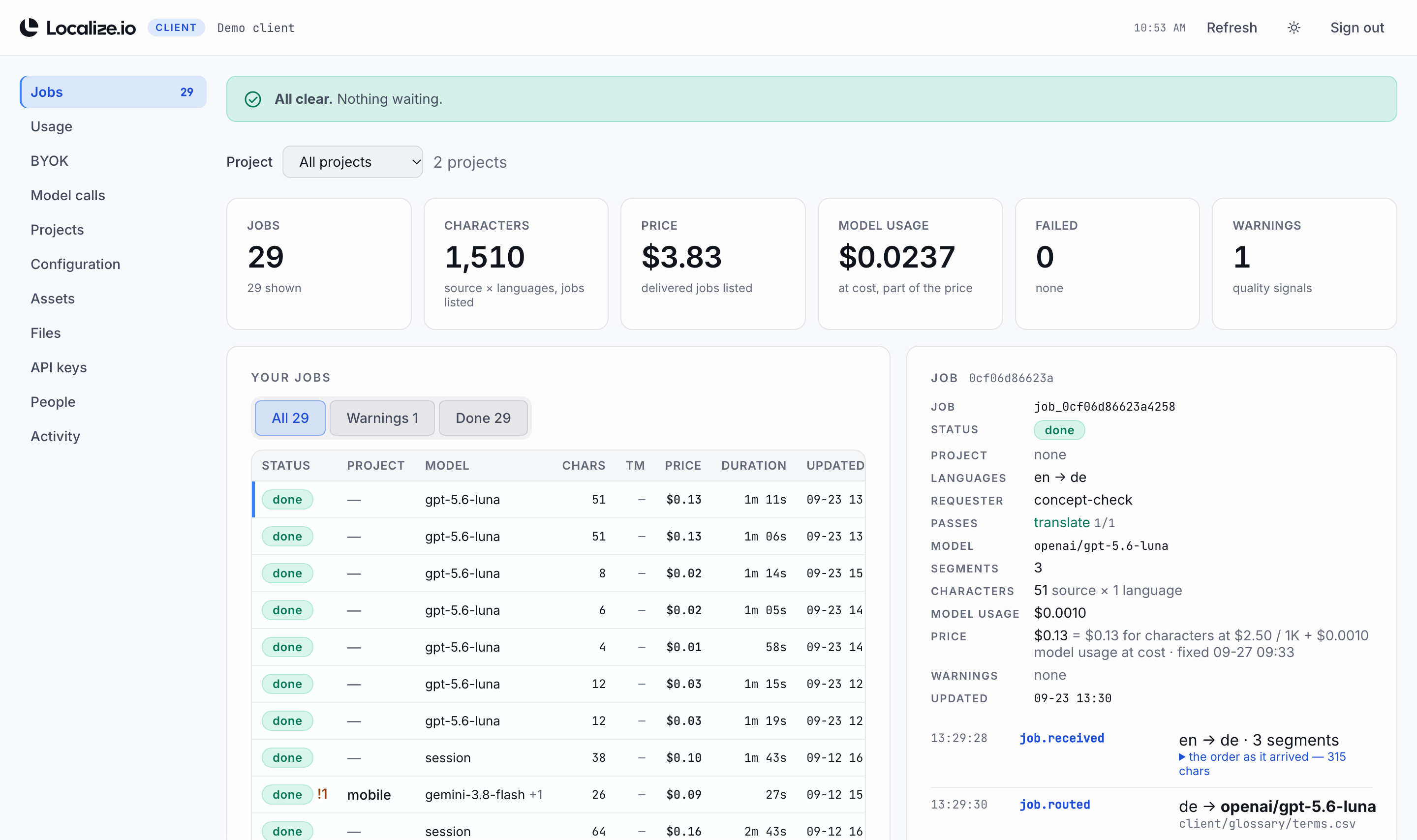
Your cabinet: every job, its characters and price, what it cost and how it was made, with Usage, BYOK,
Model calls, Projects, Configuration, Assets, Files, API keys, People and Activity beside it. Shown with a demo account.
Reliability
Invalid work stopsbefore it becomes bad work.
Refused at intake. Language pairs and content types you haven't configured, projects that don't exist, and models outside those offered are turned away when the order arrives.
Unknown screenshots are rejected. A string can't point at a screen that was never uploaded.
Checked twice before it is returned. Counted: every string back once, nothing empty, placeholders and tags identical, length limits, line breaks. Judged by a model: your terminology used, ruled-out terms absent.
Failures are sent back, then flagged. Strings that fail a check are retranslated with the findings, up to three attempts, each one logged. A string that still fails comes back with its best attempt and a question about it, and isn't charged the character rate; the rest of the job is delivered.
Warnings stay visible. Material that couldn't be applied is reported with the result, not silently dropped.
$2.50 per 1,000 characters, plus model usage at cost. Memory reused word for word
and failed jobs aren't charged. See pricing
White label, on-premises or your own models? Enterprise →
For developers
Three callsfrom order to result.
Read your configuration, send an order, and
collect the result when the job is done. Every request carries the token issued to
your team.
A key per integration. Mint and revoke your own keys, up to 24, from your cabinet or the API. Every key orders and reads; one you allow can also change your configuration. Only a fingerprint is stored, so a key can't be recovered by anyone, us included, and a revoked one stops on the next request.
Or connect over MCP. The same work as tools at https://t.localize.io/mcp, with the same key: an agent in your editor or assistant can read your configuration, order a translation, wait for it and explain how it was made. Setup below.
Ready for AI coding agents.llms.txt and SKILL.md describe the service for an agent, so one can wire up your integration from the documentation alone.
# 1. what your account is set up for
curl https://t.localize.io/v1/config \
  -H "authorization: Bearer $LOCALIZE_IO_TOKEN"

# 2. send an order (returns a job id)
curl -X POST https://t.localize.io/v1/jobs \
  -H "authorization: Bearer $LOCALIZE_IO_TOKEN" \
  -H "content-type: application/json" \
  -d @order.json

# 3. collect the translated order
curl https://t.localize.io/v1/jobs/$JOB_ID/result \
  -H "authorization: Bearer $LOCALIZE_IO_TOKEN"
Connect an agent over MCP
Add the server to any MCP client that can send a
header, in your editor or desktop assistant, with a key minted for it,
so it can be turned off on its own. The agent gets eleven tools: read your
configuration and projects, translate,
wait_for_job, get_result,
explain_job, and manage your assets and screenshots.
Every rule on this page applies unchanged, and every call lands in your record.